I got this nice mail from one friend and felt that it is worth sharing with you all. Enjoy!!!!!
1. Throw out non essential numbers. This includes age, weight and height. Let the doctors worry about them. That is why you pay them.
2. Keep only cheerful friends. The grouches pull you down. (Keep this In mind if you are one of those grouches;)
3. Keep learning. Learn more about the computer, crafts, gardening, whatever. Never let the brain get idle. "An idle mind is the devil's workshop." And the devil's name is Alzheimer's!
4. Enjoy the simple things.
5. Laugh often, long and loud. Laugh until you gasp for breath. And if you have a friend who makes you laugh, spend lots and Lots of time with HIM/HER.
6. The tears happen. Endure, grieve, and move on. The only person who is with you your entire life, is yourself. LIVE while you are alive.
7. Surround yourself with what you love, whether it's family, pets, keepsakes, music, plants, hobbies, whatever. Your home is your refuge.
8. Cherish your health. If it is good, preserve it. If it is unstable, improve it. If it is beyond what you can improve, get help.
9. Don't take guilt trips. Take a trip to the mall, even to the next county, to a foreign country, but NOT to where the guilt is.
10. Tell the people you love that you love them, at every opportunity.
And if you don't send this to at least 4 people - who cares? LOL But do share it with someone. =o)
God bless you my friend ...
Monday, January 30, 2006


Thursday, January 12, 2006
Google Mobile
We are very well know that Google is becoming part of our everydays life day to day. It has become so much popular for its search capability. Till date this was available only for web users. Now Google launched a killer Mobile application "Google Mobile Search", this makes it easy to access online information on our mobile phones and PDAs.
This is the quote from official GoogleBlog - “We’ve designed a way for you to view the things that you really care about, from your Gmail inbox to news headlines, weather, stock quotes, and feeds (Atom or RSS). The interface is optimized for small screens, and we’ve arranged things so you don’t have to click on a bunch of links to locate what you’re after -– your personalized content appears on top, right where it should be.”
This is the quote from official GoogleBlog - “We’ve designed a way for you to view the things that you really care about, from your Gmail inbox to news headlines, weather, stock quotes, and feeds (Atom or RSS). The interface is optimized for small screens, and we’ve arranged things so you don’t have to click on a bunch of links to locate what you’re after -– your personalized content appears on top, right where it should be.”
Monday, December 12, 2005
Ethnic Day

Recently we celebrated "Ethnic Day" event at our office campus. We got a chance to wear our traditional dresses at workplace, Koooool huh :-)
All our Associates participated with great enthusiasm. Really it was a fun filled event. We did catwalk with our dress before judges, really i never thought i do a catwalk in my life :-)).
To find more pictures of the event Click Here

Monday, September 05, 2005
Google Desktop Search
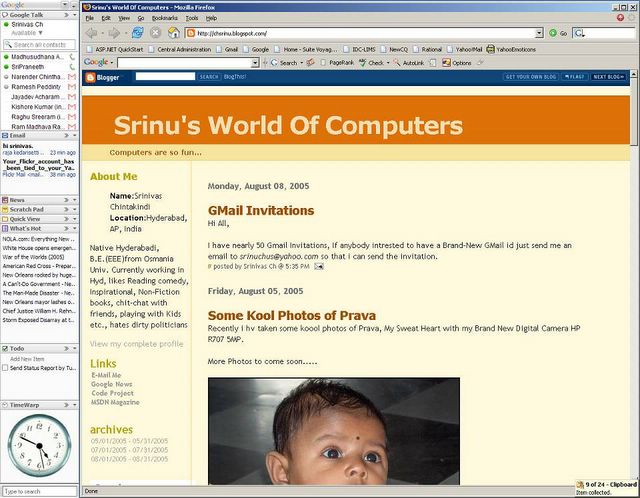
Recently i installed the new Google Desktop search application (English Version 2 Beta) in my system. The size is not even 2 MB and takes seconds to install. The main feature of this version than earlier is it has got support of Plug-ins. With the help of plug-ins we can see all our personalized info in one place with Sidebar. These plug-ins are like webparts in sharepoint. huhh :-)
The kool feature of this app is we can see somuch of data from this single application and all the items are customized. We can configure our Mail client (Gmail/outlook), Google Talk, News, WhatsHot and so many other news sources. All these plug-ins are freely available from the site.
Google also gives the "Google Desktop SDK" to write our own plug-ins. and for a limited time there is Kool "Google Desktop Developer T-shirt" for the developers who submit a plug-in. why dont you make trial for that... :-)
You can get more details and download the app from here
Monday, August 08, 2005
GMail Invitations
Hi All,
I have nearly 50 Gmail Invitations, If anybody intrested to have a Brand-New GMail id just send me an email to srinuchus@yahoo.com so that i can send the invitation.
I have nearly 50 Gmail Invitations, If anybody intrested to have a Brand-New GMail id just send me an email to srinuchus@yahoo.com so that i can send the invitation.
Friday, August 05, 2005
Some Kool Photos of Prava
Recently i hv taken some koool photos of Prava, My Sweat Heart with my Brand New Digital Camera HP R707 5MP.
More Photos to come soon.....


More Photos to come soon.....
Wednesday, July 13, 2005
Tech-Ed 2005 Hyderabad
Here is a small insight on what I expect, experience, learnt, and attended at Tech-Ed’ 2005 at ShilpaKalavedika, ShilpaRamam, Hyderabad, India on 27th and 28th of June 2005.


I attended most of the sessions conducted under “Developer Tools” and one session in “Databases” and one session in BizTalk Server. These are the list of sessions I attended at Tech-Ed.
- Managing Software Life Cycle with VS 2005 Team System
- Understanding ASP.NET 2.0 Roles, Membership and profiles API
- Testing and Quality tools in VSTS
- Security Enhancements in Visual Studio 2005
- Localization and Globalization in .Net Framework 2.0
- Visual Studio 2005 Team Foundation internals
- Orchestrating Business Processes with BizTalk
- ADO.NET 2.0 Changes
- Introducing Avalon – Future of UI
- Introducing System Transactions
Out of all the sessions I liked (also got product knowledge) sessions on Visual Studio 2005 Team System, ASP.Net 2.0, Localization and Globalization in .Net 2.0 and Avalon – The future of UI.
I am much excited by knowing VS 2005 Team system software. I hope this will definitely change the process of developing software projects in an organization. According to Microsoft “Visual Studio 2005 is not just for Developers – It is for development”. Unlike other versions of Visual Studio, Microsoft Visual Studio Team System is aimed at more than just developers. Enterprise-level application development is much more complex and thus requires a much more robust tool. With designing, architecting, coding, and testing, along with the need for project management and team development, the standard development tool just doesn't cut it by itself. This is why many enterprises invest in additional tools such as IBM Rational's XDE or Compuware's DevPartner.
This tool is aimed at a number of areas. Architects, designers, developers, and testers will all be able to use this project, meaning this is not your standard Visual Studio. The tools needed by each of these roles are incorporated into the product and integrated with the tools used by the other roles. This integration helps to provide an enterprise with an integrated tool to build end-to-end solutions.
The core of VSTS includes features such as item tracking (more than just tasks), enterprise source control (something serious—not Source Safe), powerful reporting, and many robust tools.
Visual Studio 2005 also added some new features for us, I mean ASP.NET developers. The change I wondered most is the way it creates web applications and runs them on the machine. In ASP.NET 2.0 we don’t need IIS any more to run web applications. It looks strange to hear but it is.
In earlier versions of VS we need to create the web projects under our configured virtual root only (typically all the web applications resides under http://localhost/...) but in VS 2005 we can create our web application anywhere in our hard drive as like windows application. A small web server engine comes out of box with VS 2005. When we create, compile and run the web application from VS2005 IDE this engine dynamically creates the virtual directory on the folder we created and assigns some random port to access it. In this way it works. But this is only for development and unit testing purpose. We can develop web applications as we are familiar in VS2003 also with this.
There are new classes and namespaces introduced in VS2005 to enhance the development further. For ex: they introduced new classes like memberShip and memberShipService etc. with these classes we can cut short our development work to develop so called login, authorization and authentication tasks.
One more interesting topic in the Tech-Ed is Avalon. According to Microsoft this is the future of UI. We can do whatever we want for UI in Avalon. This is like a markup language and executes in client system. As of now this is tightly integrated with “LongHorn” the next generation windows operating system. Windows XP SP2 and Windows server 2003 also had support for Avalon but not as much as LongHorn. There is a language called XAML which is used to write code for Avalon.
Overall I can say that it helped me to know and understand the new features of Visual Studio 2005. I think this would help us to develop better software especially our SuiteVoyager better. The new and exciting technology called Avalon is pretty good and attractive. This Avalon is mostly for UI purpose and also we can program it as like C#.
The most important is using VS 2005 team systems we can follow a systematic process while project is under development. All the project items we can keep at one place so it makes the life of ours easy.
Subscribe to:
Posts (Atom)